
Unified access to the best community driven cheat sheets repositories of the world.
Let's imagine for a moment that there is such a thing as an ideal cheat sheet.
How it should look like?
What features should it have?
* **concise** — it should be concise; it should contain only things you need and nothing else;
* **fast** — it should be possible to use it instantly;
* **comprehensive** — it should contain answers for every question you could have;
* **universal** — it should be available everywhere, as soon as needed, without any preparations;
* **unobtrusive** — it does not distract you from your main task when you are using it;
* **tutoring** — it helps you to learn the subject;
* **inconspicuous** — it should be possible to use it completely unnoticed.
Such a thing does exist.
## Features
**cheat.sh**
* has simple curl/browser interface;
* covers 55 programming languages, several DBMSes, and more than 1000 most important UNIX/Linux commands;
* provides access to the best community driven cheat sheets repositories in the world as well as to StackOverflow;
* available everywhere, no installation needed;
* ultrafast, returns answers, as a rule, within 100 ms;
* has a convenient command line client, `cht.sh`, that is very advantageous and helpful, though not mandatory;
* can be used directly from code editors, without opening a browser and not switching your mental context;
* supports a special mode (stealth mode), where it can be used fully invisibly, not even touching a key and not making a sound.
## Usage
To get a cheat sheet for a UNIX/Linux command from a command line, query the service using `curl` or any other HTTP/HTTPS client
specifying the name of the command in the query:
```
curl cheat.sh/tar
curl cht.sh/curl
curl https://cheat.sh/rsync
curl https://cht.sh/tr
```
As you can see, you can use both HTTPS and HTTP to access the service, and both the long (cheat.sh) and the short (cht.sh) service names.
Here `tar`, `curl`, `rsync`, and `tr` are names of the UNIX/Linux commands, you want to get cheat sheets for.
If you don't know the name of the command you need, you can search for it using the `~KEYWORD` notation.
For example, to see how you can make `snapshots` of a filesystem/volume/something else:
```
curl cht.sh/~snapshot
```
Programming languages cheat sheets are located not directly in the root namespace,
but in special namespaces, dedicated to them:
```
curl cht.sh/go/Pointers
curl cht.sh/scala/Functions
curl cht.sh/python/lambda
```
To get the list of available programming language cheat sheets, do a special query `:list`:
```
curl cht.sh/go/:list
```
(almost) each programming language has a special page, named `:learn`,
that describes the language basics (that's a direct mapping from the *"Learn X in Y"* project).
It could be a good starting point, if you've just started learning a language.
If there is no cheat sheet for some programming language query (and it is almost always the case),
it is generated on the fly, basing on available cheat sheets and answers on StackOverflow.
Of course, there is no guarantee that the returned cheat sheet will be a 100% hit, but it is almost always exactly what you are looking for.
Try these (and your own) queries to get the impression of that, how the answers look like:
```
curl cht.sh/go/reverse+a+list
curl cht.sh/python/random+list+elements
curl cht.sh/js/parse+json
curl cht.sh/lua/merge+tables
curl cht.sh/clojure/variadic+function
```
If you don't like an answer for some of your queries, you can pick another one: for that, repeat the query with an additional parameter `/1`, `/2` etc. appended:
```
curl cht.sh/python/random+string
curl cht.sh/python/random+string/1
curl cht.sh/python/random+string/2
```
Cheat sheets are formatted as code of the queried programming language (at least we are trying our best to do so)
so they can be pasted into a program in this language directly. Text comments, if there are any, are formatted according to the language syntax.
```
$ curl cht.sh/lua/table+keys
-- lua: retrieve list of keys in a table
local keyset={}
local n=0
for k,v in pairs(tab) do
n=n+1
keyset[n]=k
end
--[[
[ Note that you cannot guarantee any order in keyset. If you want the
[ keys in sorted order, then sort keyset with table.sort(keyset).
[
[ [lhf] [so/q/12674345] [cc by-sa 3.0]
]]
```
If you don't need text comments in the answer, you can eliminate them
using a special option `?Q`:
```
$ curl cht.sh/lua/table+keys?Q
local keyset={}
local n=0
for k,v in pairs(tab) do
n=n+1
keyset[n]=k
end
```
And if you don't need syntax highlighting, switch it off using `?T`.
You can combine the options together:
```
curl cht.sh/go/reverse+a+list?Q
curl cht.sh/python/random+list+elements?Q
curl cht.sh/js/parse+json?Q
curl cht.sh/lua/merge+tables?QT
curl cht.sh/clojure/variadic+function?QT
```
Full list of all options described below and in `/:help`.
Try your own queries. Follow these rules:
1. Try to be more specific (`/python/append+file` is better than `/python/file` and `/python/append`);
2. Ask practical question if possible (yet theoretical question are possible too);
3. Ask programming language questions only; specify the name of the programming language as the section name;
4. Separate words with `+` instead of spaces;
5. Do not use special characters, they are ignored anyway.
Read more about the programming languages queries below.
## Command line client, cht.sh
The cheat.sh service has its own command line client (`cht.sh`), that,
comparing to quering the service directly with `curl`,
has several useful features:
* Special shell mode with a persistent queries context and readline support;
* Queries history;
* Clipboard integration;
* Tab completion support for shells (bash, fish, zsh);
* Stealth mode.
To install the client:
```
curl https://cht.sh/:cht.sh > ~/bin/cht.sh
chmod +x ~/bin/cht.sh
```
Now, you can use `cht.sh` instead of `curl`, and write your queries in more natural way,
with spaces instead of `+`:
```
$ cht.sh go reverse a list
$ cht.sh python random list elements
$ cht.sh js parse json
```
It is even more convenient to start the client in a special shell mode:
```
$ cht.sh --shell
cht.sh> go reverse a list
```
If all your queries are supposed to be about the same language, you can change the context of the queries
and spare repeating the programming language name:
```
$ cht.sh --shell
cht.sh> cd go
cht.sh/go> reverse a list
```
or even start the client in this context:
```
$ cht.sh --shell go
cht.sh/go> reverse a list
...
cht.sh/go> join a list
...
```
If you want to change the context, you can do it with the `cd` command,
or if you want do a single query for some other language, just prepend it with `/`:
```
$ cht.sh --shell go
...
cht.sh/go> /python dictionary comprehension
...
```
If you want to copy the last answer into the clipboard, you can
use the `c` (`copy`) command, or `C` (`ccopy`, without comments).
```
cht.sh/python> append file
# python - How do you append to a file?
with open("test.txt", "a") as myfile:
myfile.write("appended text")
cht.sh/python> C
copy: 2 lines copied to the selection
```
Type `help` for other internal `cht.sh` commands.
```
cht.sh> help
help - show this help
hush - do not show the 'help' string at start anymore
cd LANG - change the language context
copy - copy the last answer in the clipboard (aliases: yank, y, c)
ccopy - copy the last answer w/o comments (cut comments; aliases: cc, Y, C)
exit - exit the cheat shell (aliases: quit, ^D)
id [ID] - set/show an unique session id ("reset" to reset, "remove" to remove)
stealth - stealth mode (automatic queries for selected text)
update - self update (only if the scriptfile is writeable)
version - show current cht.sh version
/:help - service help
QUERY - space ceparated query staring (examples are below)
cht.sh> python zip list
cht.sh/python> zip list
cht.sh/go> /python zip list
```
### Tab completion
To activate tab completion support for `cht.sh`, add the `:bash_completion` script to your `~/.bashrc`:
```
$ curl https://cheat.sh/:bash_completion > ~/.bash.d/cht.sh
$ . ~/.bash.d/cht.sh
$ # and add . ~/.bash.d/cht.sh to ~/.bashrc
```
### Stealth mode
One of the important properties of any real cheat sheet,
is that it could be used fully unnoticed.
cheat.sh can be used completely unnoticed too. The cheat.sh client, `cht.sh`, has
a special mode, called **stealth mode**, using that you don't even need to touch your
keyboard to open some cheat sheet.
In this mode, as soon as you select some text with the mouse (and thus it is added
into the selection buffer of X Window System or into the clipboard) it's used
as a query string for cheat.sh, and the correspondent cheat sheet is automatically shown.
Let's imagine, that you are having an online interview, where your interviewer asks you
some questions using a shared document (say Google Docs) and you are supposed
to write your coding answers there (it's possible too that you'll type in the questions
on your own, just to show to the interviewer that you've heard it right).
When using the stealth mode of `cht.sh`, the only thing you need to do in order to see
a cheat sheet for some question, is to select the question using the mouse.
If you don't want any text in the answers and the only thing you need is code,
use the `Q` option when starting the stealth mode.
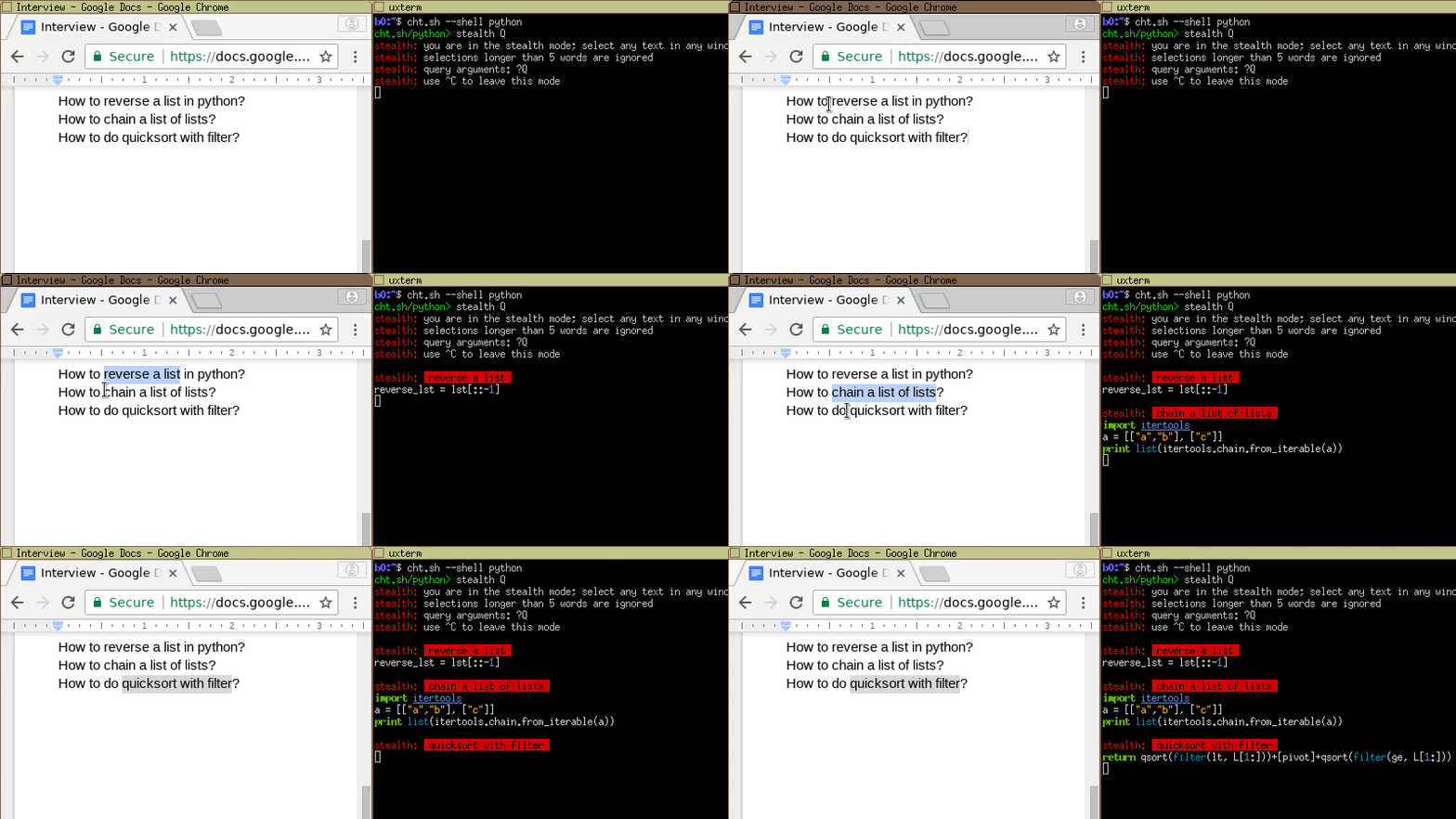
```
You: Hi! | $ cht.sh --shell python
She: Hi! | cht.sh/python> stealth Q
She: Are you ready for a small interview? | stealth: you are in the stealth mode; select any text
She: Just a couple of questions | stealth: selections longer than 5 words are ignored
She: We will talk about python | stealth: query arguments: ?Q
She: Let's start from something simple. | stealth: use ^C to leave this mode
She: Do you know how to reverse a list in python? |
You: Sure |
You: (selecting "reverse a list") | stealth: reverse a list
| reverse_lst = lst[::-1]
You: lst[::-1]? |
She: Good. |
She: Do you know how to chain a list of lists? |
You: (selecting "chain a list of lists") | stealth: chain a list of lists
| import itertools
| a = [["a","b"], ["c"]]
| print list(itertools.chain.from_iterable(a))
You: May I use external modules? |
She: What module do you want to use? |
You: itertools |
She: Yes, you may use it |
You: Ok, then: |
You: itertools.chain.from_iterable(a) |
She: Good. Let's try something harder. |
She: What about quicksort implementation? |
You: (selecting "quicksort implementation") | stealth: quicksort implementation
You: Let me think about it. | (some big and clumsy lowlevel implementation is shown)
You: Well...(starting typing it in) | def sort(array=[12,4,5,6,7,3,1,15]):
| less = []
She: (seeing your ugly pascal style) | equal = []
She: Could you write it more concise? | greater = []
| if len(array) > 1:
You: What do you mean? | pivot = array[0]
| for x in array:
She: I mean, | if x < pivot: less.append(x)
She: do you really need all these ifs and fors? | if x == pivot: equal.append(x)
She: Could you may be just use filter instead? | if x > pivot: greater.append(x)
| return sort(less)+equal+sort(greater)
You: quicksort with filter? | else:
| return array
She: Yes |
You: (selecting "quicksort with filter") | stealth: quicksort with filter
You: Ok, I will try. | return qsort(filter(lt, L[1:]))+[pivot] \
You: Something like this? | +qsort(filter(ge, L[1:]))
You: qsort(filter(lt, L[1:]))+[pivot] \ |
+ qsort(filter(ge, L[1:])) |
|
She: Yes! Perfect! Exactly what I wanted to see! |
|
```
Or course, it is just fun, and you should never cheat in your coding interviews,
because you know what happens when you do.

## Editors integration
You can use *cheat.sh* directly from the editor (*Vim* and *Emacs* are currently supported).
Instead of opening your browser, googling, browsing Stack Overflow
and eventually copying the code snippets you need into the clipboard
and later pasting them into the editor,
you can achieve the same instantly and without leaving the editor at all!
Here is how it looks like in Vim:
1. If you have a question while editing a program, you can just type
your question directly in the buffer and press `KK`. You will get
the answer to your question in pager. (with `KB` you'll get the answer
in a separate buffer).
2. If you like the answer, you can manually paste it from the buffer or
the pager, or if you are lazy you can use `KP` to paste it below/under
your question (or replace you question using `KR`). If you want the
answer without the comments, `KC` replays the last query
toggling them.
### Vim
* [cheat.sh-vim](https://github.com/dbeniamine/cheat.sh-vim) — Vim support
[](https://asciinema.org/a/c6QRIhus7np2OOQzmQ2RNXzRZ)
### Emacs
* [cheat-sh.el](https://github.com/davep/cheat-sh.el) — Emacs support (available also at cheat.sh/:emacs)
* cheat.sh/:emacs-ivy — Emacs support for ivy users
[](https://asciinema.org/a/3xvqwrsu9g4taj5w526sb2t35)
## Special pages
There are several special pages (their names are always starting with a colon),
that are not cheat sheets and have special meaning.
Getting started:
```
:help description of all special pages and options
:intro cheat.sh introduction, covering the most important usage questions
:list list all cheat sheets (can be used in a subsection too: /go/:list)
```
Command line client `cht.sh` and shells support:
```
:cht.sh code of the cht.sh client
:bash_completion bash function for tab completion
:bash bash function and tab completion setup
:fish fish function and tab completion setup
:zsh zsh function and tab completion setup
```
Editors support:
```
:vim cheat.sh support for Vim
:emacs cheat.sh function for Emacs
:emacs-ivy cheat.sh function for Emacs (uses ivy)
```
Other pages:
```
:post how to post new cheat sheet
:styles list of color styles
:styles-demo show color styles usage examples
```
## Search
To search for a keyword, use the query:
```
/~keyword
```
In this case search is not recursive — it is conducted only in a pages of the specified level.
For example:
```
/~snapshot look for snapshot in the first level cheat sheets
/scala/~currying look for currying in scala cheat sheets
```
For a recursive search in all cheat sheets, use double slash:
```
/~snapshot/r look for snapshot in all cheat sheets
```
You can use special search options after the closing slash:
```
/~shot/bi case insensitive (i), word boundaries (b)
```
List of search options:
```
i case insensitive search
b word boundaries
r recursive search
```
## Programming languages cheat sheets
Cheat sheets related to programming languages
are organized in namespaces (subdirectories), that are named according
to the programming languages.
For each supported programming language
there are several special cheat sheets: its own sheet, `hello`, `:list` and `:learn`.
Say for lua it will look like:
```
lua
lua/hello
lua/:list
lua/:learn
```
Some languages has the one-liners-cheat sheet, `1line`:
```
perl/1line
```
* `hello` describes how you can start with the language — install it if needed, build and run its programs, and it shows the "Hello world" program written in the language;
* `:list` shows all topics related to the language
* `:learn` shows a learn-x-in-minutes language cheat sheet perfect for getting started with the language.
* `1line` is a collection of one-liners in this language
* `weirdness` is a collection of examples of weird things in this language

At the moment, cheat.sh covers the 55 following programming languages (alphabetically sorted):
|Prefix |Language |Basics|One-liners|Weirdness|StackOverflow|
|-----------|----------|------|----------|---------|-------------|
|`arduino/` |Arduino | | | |✓ |
|`assembly/`|Assembly | | | |✓ |
|`awk/` |AWK |✓ | | |✓ |
|`bash/` |Bash |✓ | | |✓ |
|`basic/` |BASIC | | | |✓ |
|`bf/` |Brainfuck |✓ | | |✓ |
|`c/` |C |✓ | | |✓ |
|`chapel/` |Chapel |✓ | | |✓ |
|`clean/` |Clean | | | |✓ |
|`clojure/` |Clojure |✓ | | |✓ |
|`coffee/` |CoffeeScript|✓ | | |✓ |
|`cpp/` |C++ |✓ | | |✓ |
|`csharp/` |C# |✓ | | |✓ |
|`d/` |D |✓ | | |✓ |
|`dart/` |Dart |✓ | | |✓ |
|`delphi/` |Dephi | | | |✓ |
|`dylan/` |Dylan |✓ | | |✓ |
|`eiffel/` |Eiffel | | | |✓ |
|`elixir/` |Elixir |✓ | | |✓ |
|`elisp/` |ELisp |✓ | | |✓ |
|`elm/` |Elm |✓ | | |✓ |
|`erlang/` |Erlang |✓ | | |✓ |
|`factor/` |Factor |✓ | | |✓ |
|`fortran/` |Fortran |✓ | | |✓ |
|`forth/` |Forth |✓ | | |✓ |
|`fsharp/` |F# |✓ | | |✓ |
|`go/` |Go |✓ | | |✓ |
|`groovy/` |Groovy |✓ | | |✓ |
|`haskell/` |Haskell |✓ | | |✓ |
|`java/` |Java |✓ | | |✓ |
|`js/` |JavaScript|✓ |✓ |✓ |✓ |
|`julia/` |Julia |✓ | | |✓ |
|`kotlin/` |Kotlin |✓ | | |✓ |
|`lisp/` |Lisp |✓ | | |✓ |
|`lua/` |Lua |✓ | | |✓ |
|`matlab/` |MATLAB |✓ | | |✓ |
|`ocaml/` |OCaml |✓ | | |✓ |
|`perl/` |Perl |✓ |✓ | |✓ |
|`perl6/` |Perl 6 |✓ |✓ | |✓ |
|`php/` |PHP |✓ | | |✓ |
|`pike/` |Pike | | | |✓ |
|`python/` |Python |✓ | | |✓ |
|`python3/` |Python 3 |✓ | | |✓ |
|`r/` |R |✓ | | |✓ |
|`racket/` |Racket |✓ | | |✓ |
|`ruby/` |Ruby |✓ | | |✓ |
|`rust/` |Rust |✓ | | |✓ |
|`scala/` |Scala |✓ | | |✓ |
|`scheme/` |Scheme |✓ | | |✓ |
|`swift/` |Swift |✓ | | |✓ |
|`tcsh/` |Tcsh |✓ | | |✓ |
|`tcl/` |Tcl |✓ | | |✓ |
|`objective-c/`|Objective-C|✓ | | |✓ |
|`vb/` |VisualBasic|✓ | | |✓ |
|`vbnet/` |VB.Net |✓ | | |✓ |
## Cheat sheets sources
Instead of creating yet another mediocre cheat sheet repository,
we are concentrating our efforts on creation of a unified
mechanism to access selected existing well developed and good maintained
cheat sheet repositories covering topics of our interest:
programming and operating systems usage.
*cheat.sh* uses selected community driven cheat sheet repositories
and information sources, maintained by thousands of users, developers and authors
all over the world
(in the *Users* column number of contributors/number of stars is shown):
|Cheat sheets |Repository | Users | Creation Date |
|-----------------------|------------------------------------------------------|------------|---------------|
|UNIX/Linux, programming|[cheat.sheets](https://github.com/chubin/cheat.sheets)| 6/54 | May 1, 2017 |
|UNIX/Linux commands |[tldr-pages/tldr](https://github.com/tldr-pages/tldr) | 541/17360 | Dec 8, 2013 |
|UNIX/Linux commands |[chrisallenlane/cheat](https://github.com/chrisallenlane/cheat)|105/4193|Jul 28, 2013|
|Programming languages |[adambard/learnxinyminutes-docs](https://github.com/adambard/learnxinyminutes-docs)|1096/5285|Jun 23, 2013|
|Go |[a8m/go-lang-cheat-sheet](https://github.com/a8m/go-lang-cheat-sheet)|29/3034|Feb 9, 2014|
|Perl |[pkrumnis/perl1line.txt](https://github.com/pkrumins/perl1line.txt)|4/165|Nov 4, 2011|
|Programming languages |[StackOverflow](https://stackoverflow.com)|9M |Sep 15, 2008|
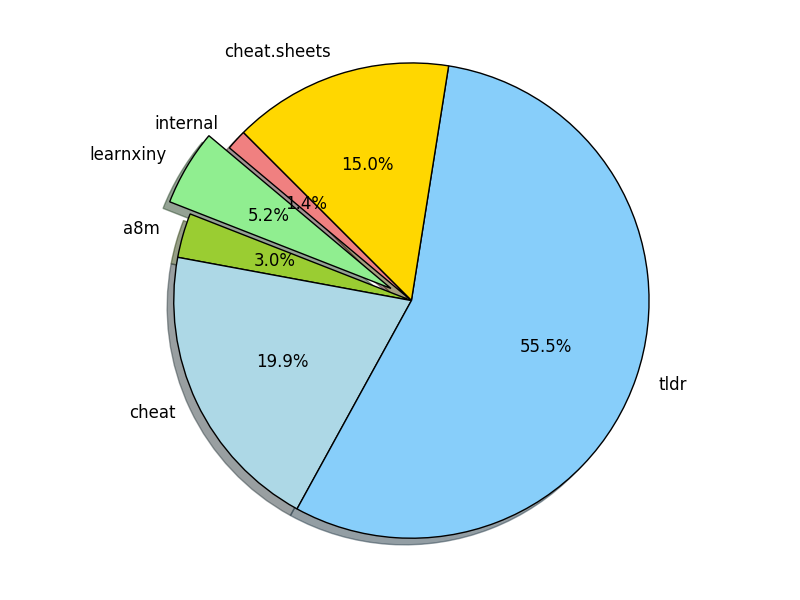
Pie diagram reflecting cheat sheets sources distribution (by number of cheat sheets on cheat.sh originating from a repository):
## How to contribute
### How to edit a cheat sheet
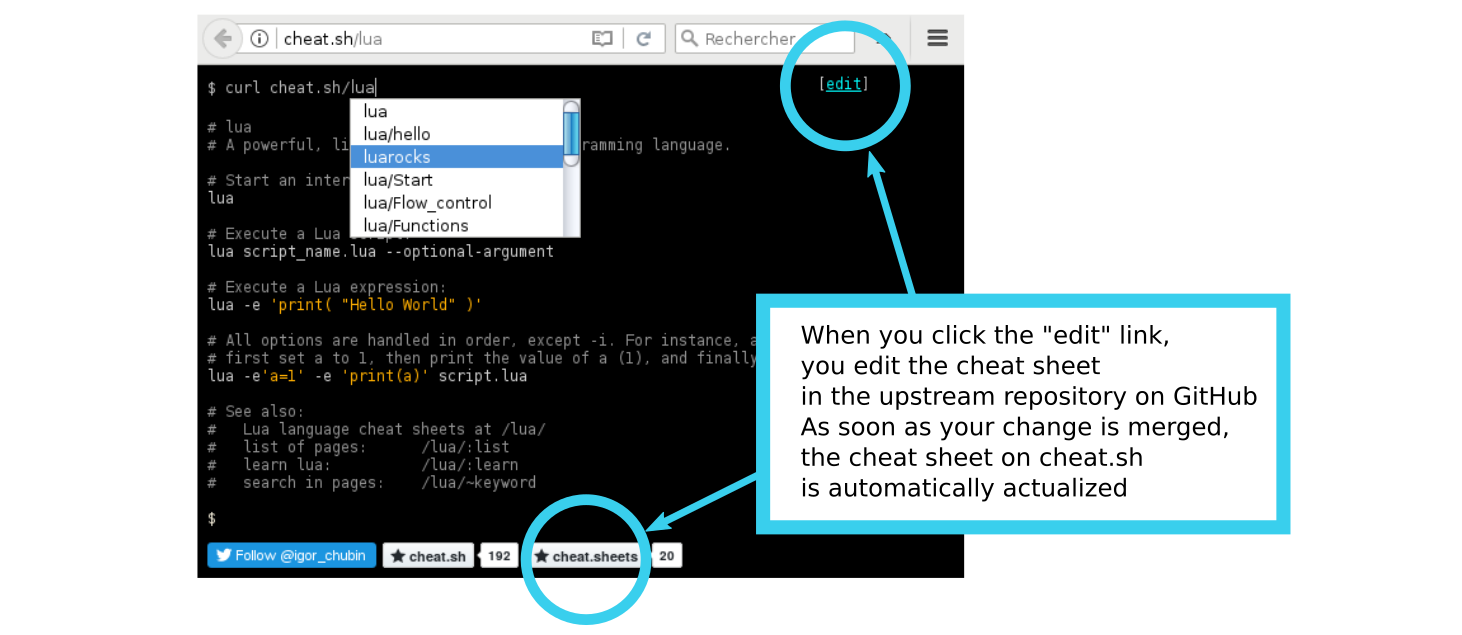
If you want to edit a cheat.sh cheat sheet, you should edit it in the upstream repository.
You will find the name of the source repository in a browser, when you open a cheat sheet.
There are two github buttons in the bottom of the page: the second one is the button
of the repository, whom belongs the current cheat sheet.
You can edit the cheat sheet directly in your browser (you need a github account for it).
There is a edit button in the top right corner. If you click on it, an editor will be open.
There you will change the cheat sheet (under the hood: the upstrem repository is forked, your changes are
commited in the forked repository, a pull request to the upstream repository owner is sent).
### How to add a cheat sheet
If you want to add a cheat sheet, you have one of the following
ways:
* Add it to one of the external cheat sheets repositories; you should decide on your own what is the best repository for your cheat sheet;
* Add it to the local cheat.sh repository ([cheat.sheets](https://github.com/chubin/cheat.sheets)) on github (fork, commit, pull request);
* Post it on cheat.sh using curl or a web browser ([cheat.sh/:post](http://cheat.sh/:post)).
If you want to change an existing cheat sheet,
you have to find the original repository (when you open a cheat sheet in a browser,
you see the repository's github button in the bottom of the cheat sheet),
the cheat sheet is coming from, and change it there.
After some time the changes will be synchronized on cheat.sh.
### How to add a cheat sheet repository
If you want to add a cheat sheet repository to cheat.sh, please open an issue:
* [Add a new repository](https://github.com/chubin/cheat.sh/issues/new)
Please specify the name of the repository, and give its short description.